
What Is EXIF Data? A Practical Privacy Guide
Use the tool below to remove EXIF and photo metadata in your browser.
or drag and drop files anywhere here
How to Remove EXIF and Photo Metadata in 3 Steps
Follow these three steps. Each image shows only the control used in that step.
Step 1
Upload the photo
Drop the photo into the upload area or choose it from your device.
Open the tool
Step 2
Review the metadata
Check the detected EXIF and photo metadata and select the fields you want to remove.
Open the tool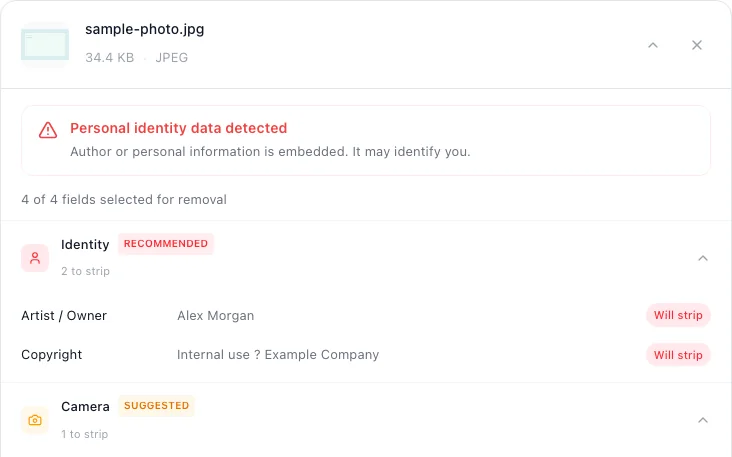
Step 3
Remove and download
Start the cleaner and download the new copy.
Open the tool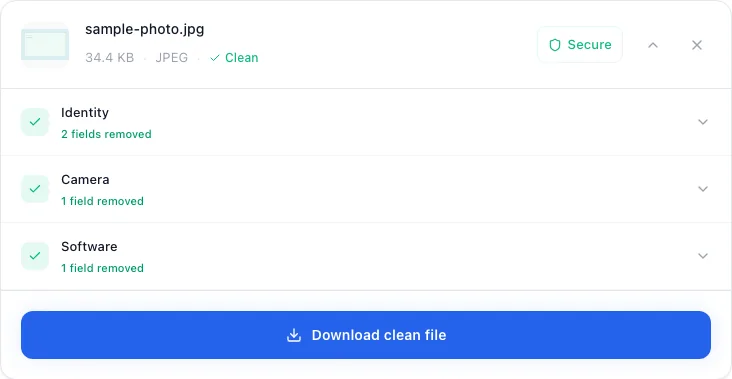


EXIF and Photo Metadata this tool can remove
Check the highest priority fields first.
- Exact GPS coordinatesRemove first
- Capture date and timeHigh priority
- Camera, phone, and lens modelHigh priority
- Author, copyright, and editing softwareReview
EXIF and Photo Metadata questions
Short answers about verification, file quality, and format limits.
What is EXIF data?
EXIF stands for Exchangeable image file format. Camera makers and imaging software use it to describe how an image was captured and how it should be interpreted. The standard is maintained through the Camera and Imaging Products Association; the EXIF 2.3 specification defines the tags and file structures behind the familiar fields shown by photo applications.
EXIF is commonly embedded in JPEG and TIFF-based files. Other formats can carry metadata through different mechanisms. WebP has dedicated EXIF/XMP chunks, PNG uses an extensible chunk model, and GIF has extension blocks. People often call all of this “EXIF,” but the technical distinction matters when inspecting or cleaning a file.
What information can EXIF contain?
| Field family | Examples | Why it exists |
|---|---|---|
| Capture settings | Aperture, shutter speed, ISO, flash, focal length | Photography workflow and image interpretation |
| Time | DateTimeOriginal, digitized time, offset information | Sorting and reconstructing a capture timeline |
| Location | Latitude, longitude, altitude, direction | Geotagging and location-based organization |
| Equipment | Camera make/model, lens model, serial-number fields | Asset management, support, and photography analysis |
| Image handling | Orientation, dimensions, color space, embedded thumbnail | Correct rendering and quick previews |
| Authorship | Artist, copyright, description or related fields | Rights management and attribution |
A photo does not necessarily contain every field. Location recording depends on device permissions and settings; serial numbers and author fields vary by camera and software; editing or export may add, change, or remove data.
Which EXIF fields matter most for privacy?
The highest-priority review usually starts with precise location, capture time, unique device or lens identifiers, names, and comments. Those fields can directly expose where a photo was taken, when it was taken, or who created it.
Camera settings such as aperture or ISO are generally less sensitive by themselves. They may still add context, but treating every technical number as equally dangerous makes review noisy. A useful privacy process prioritizes identifiable context rather than simply maximizing the number of deleted fields.
What photo metadata is not EXIF?
XMP can record descriptive fields and editing workflow information. IPTC metadata is widely used for creator, rights, caption, location, and editorial details; the IPTC Photo Metadata Standard documents those fields separately. Color profiles, file-system timestamps, filenames, and application databases are also outside the core EXIF tag set.
This is why the companion guide says remove supported photo metadata, not merely “delete EXIF.” The correct cleaning path depends on both the file format and the metadata structure inside it.
Do social and messaging platforms remove EXIF?
Some services re-encode uploaded images or remove selected metadata, while others preserve an original file or offer a “send as document/file” mode that changes the outcome. These behaviors can differ by app version, upload path, account setting, and whether the recipient receives a preview or the original asset.
A static list saying that a platform “always strips EXIF” becomes unreliable quickly. If a particular sharing path matters, test that exact path with a synthetic image containing known non-sensitive fields, download the recipient's copy, and inspect it. Cleaning before upload reduces dependence on an undocumented platform behavior.
Written and maintained by
metapeel Editorial TeamThe team that documents metapeel's browser-based metadata inspection and cleaning behavior against the current implementation and primary format references.