Complete Guide to File Metadata — How Every File Tracks You
Every digital file you create, receive, or share contains more information than what meets the eye. Beneath the visible content — the image, the text, the video, the music — lies a hidden layer of data called metadata. This embedded information records details about the file's origin, authorship, editing history, and technical characteristics. In many cases, it can reveal your identity, location, device, and behavior patterns. This guide covers every major file type and explains exactly what metadata each one carries.
What is File Metadata?
Metadata is often described as "data about data." In the context of digital files, it is structured information embedded within the file itself that describes the file's content, origin, and attributes. Unlike the visible content — the pixels of an image, the characters in a document, or the audio waveform — metadata is stored in dedicated data structures within the file format and is not displayed during normal use.
Metadata exists for legitimate reasons. Camera manufacturers need a standard way to record exposure settings so that photo software can organize and adjust images. Document creators need to track authorship and revision history for collaboration. Music players need artist and album information to organize libraries. The problem is not that metadata exists — it is that most people are unaware of it, and it persists in files long after the useful purpose has been served.
Crucially, metadata is embedded within the file, not stored separately. When you email a photo, upload a document, or share a video, the metadata travels with it. Anyone who receives the file can extract this information using readily available tools. This is why metadata awareness is a fundamental aspect of digital privacy.
Image Metadata
Image files carry some of the richest and most privacy-sensitive metadata of any file type. Three major metadata standards are commonly found in images:
EXIF (Exchangeable Image File Format)is the most well-known image metadata standard. It is automatically generated by digital cameras and smartphones at the moment of capture. EXIF data can include GPS coordinates (recording exactly where the photo was taken), the camera or phone model, lens information, exposure settings (aperture, shutter speed, ISO), the exact date and time of capture, software used to process the image, and in some cases the camera's unique serial number. A single smartphone photo can contain over 100 individual EXIF fields.
IPTC (International Press Telecommunications Council)metadata is typically added manually by photographers, news agencies, and stock photo services. It contains fields for the photographer's name, copyright information, captions, keywords, and location descriptions. While IPTC data is more common in professional photography, consumer editing tools like Adobe Lightroom and Apple Photos also write IPTC fields when users add titles, descriptions, or tags to their images.
XMP (Extensible Metadata Platform) was developed by Adobe as a standardized, XML-based metadata framework. XMP can contain all of the information found in EXIF and IPTC, plus additional fields for editing history, color profiles, ratings, and custom application data. When you edit a photo in Photoshop, Lightroom, or similar tools, XMP records every adjustment you make. XMP is increasingly common and can be embedded in virtually any image format.
Document Metadata
Office documents are among the most metadata-heavy file types, and they pose particular risks in professional and legal contexts.
PDF filescan contain a comprehensive set of metadata fields: document title, author name, subject, keywords, creation date, modification date, the application used to create the PDF, the operating system of the creator's machine, PDF producer information, and a full revision history. PDFs can also embed JavaScript, form data, and annotations. In sensitive environments, PDF metadata has been responsible for revealing the true author of "anonymous" documents, the timing of edits, and the software environment of the creator. Law firms, government agencies, and corporate legal departments routinely run metadata scrubbing processes before sharing documents externally.
DOCX files (Microsoft Word) carry extensive metadata beyond the basic document properties. The core properties include author, title, subject, creation and modification timestamps, and the name of the modifying application. More concerning, DOCX files can retain tracked changes and commentseven when the user believes they have been removed. Word's "Track Changes" feature records every insertion, deletion, and formatting change with timestamps and author attribution. Simply accepting all changes does not always remove the revision history from the file's internal XML structure. DOCX files can also contain hidden text, watermarks, and custom XML data that is not visible in the normal editing view.
XLSX files (Microsoft Excel) share the same core metadata as DOCX files — author, creation date, modification history, and application information. Additionally, spreadsheets may contain hidden sheets, hidden rows and columns, named ranges that reference internal calculations, and cell comments. Data in hidden sheets is fully preserved in the file and can be revealed by anyone who knows how to unhide them. This has been the source of numerous data leaks when organizations shared spreadsheets without properly scrubbing hidden content.
Video Metadata
Video files store metadata within their container formats. The two most common containers — MP4 and MOV — can carry a substantial amount of embedded information.
MP4 filesuse the ISO Base Media File Format, which organizes metadata into discrete "boxes" (also called "atoms"). Common metadata includes the video and audio codec specifications, resolution, frame rate, bitrate, duration, and creation date. Some MP4 files also contain GPS coordinates if the video was recorded on a smartphone with location services enabled. The metadata may also include the recording device model, software version, and in some cases a unique device identifier.
MOV files (Apple QuickTime) follow a similar atom-based structure and can contain comparable metadata. MOV files created on iPhones may include location data, the camera model, and detailed capture settings. Both MP4 and MOV files can also contain subtitle tracks, chapter markers, and secondary audio tracks that are not immediately visible during playback but are embedded in the file.
Beyond container metadata, some video editing software writes its own metadata layers. Adobe Premiere Pro, Final Cut Pro, and DaVinci Resolve can embed project information, editor details, editing history, and color grading data into exported files. If you share a video file exported from professional editing software, the recipient may be able to determine exactly which program was used, the timeline settings, and potentially the editor's identity.
Audio Metadata
Audio files use several tagging systems depending on the format. The most common is ID3 tags in MP3 files, which can store the track title, artist name, album, year, genre, composer, conductor, and embedded cover art images. ID3 tags come in two versions: ID3v1, a simple format limited to basic fields, and ID3v2, a more expansive format that supports virtually unlimited text, multiple images, synchronized lyrics, and custom fields.
Vorbis Comments are used in FLAC and OGG files. They follow a simple key-value pair structure that can contain any arbitrary metadata. Common fields include title, artist, album, track number, genre, date, and a description field. Vorbis Comments can also embed cover art through a dedicated metadata block.
iTunes atoms(also called MP4 boxes) are used in M4A and AAC files purchased from or processed by Apple's ecosystem. These can contain purchase information, Apple account identifiers, and extended tag fields. For users who have purchased music from the iTunes Store, these files may contain account-related data that could potentially be linked to their Apple ID.
Audio metadata matters because it persists through copying and sharing. When you share a music file, a podcast clip, or a voice memo, the tags travel with the file. Artist names, album information, and embedded cover art can reveal personal preferences. Comments and custom fields may contain personal notes. For journalists, activists, and anyone who values privacy, stripping audio metadata before sharing is a necessary precaution.
Best Practices for Metadata Removal
Managing file metadata should be a routine part of your digital hygiene, not an afterthought. Here are the practices that will keep you protected:
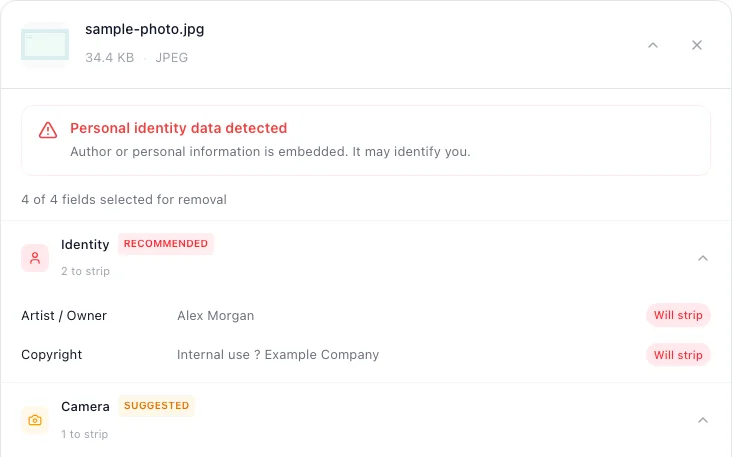
- Check files before sharing. Before sending any file — whether by email, messaging app, cloud link, or physical transfer — check what metadata it contains. metapeel lets you see exactly what is embedded before you clean it.
- Use dedicated tools. Manual metadata removal is error-prone and time-consuming. Properties dialogs in operating systems often show only a fraction of the actual metadata. Use a tool like metapeel that parses the full file structure and removes all metadata containers.
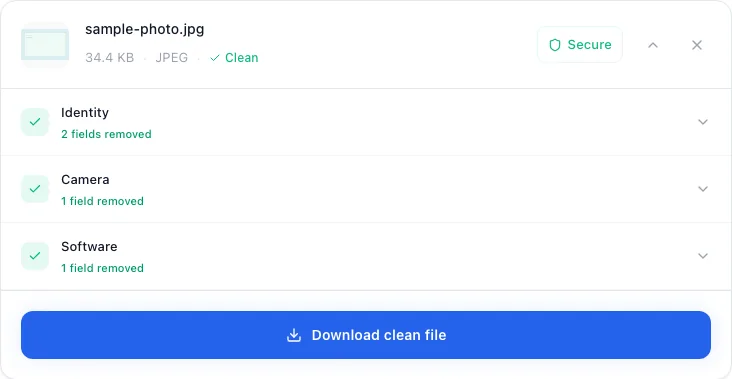
- Verify the results. After cleaning a file, verify that the metadata has been removed. You can use metapeel itself to scan the cleaned file and confirm that no metadata remains.
- Make it a habit. The most effective approach is to integrate metadata removal into your regular workflow. Treat it like locking your door — an automatic step you take every time you share a file, without having to think about it.
- Pay special attention to documents. Office documents carry the highest risk for professional consequences. Always scrub metadata from DOCX, XLSX, and PDF files before sharing them externally. Pay particular attention to tracked changes and comments in Word documents.
The goal is not to be paranoid — it is to be informed and intentional. Metadata exists for valid reasons, but you should control when and with whom it is shared.
Remove All Metadata with metapeel
metapeel is designed to handle every file type discussed in this guide. Whether you need to strip GPS data from a photo, remove author information from a PDF, clear ID3 tags from an MP3, or scrub metadata from a video file, metapeel does it all in one place. Every operation runs locally in your browser — your files never leave your device, and no server ever sees your data.
The process is the same regardless of file type: drop your file, review the detected metadata, and download a clean version. metapeel supports JPEG, PNG, WebP, HEIC, GIF, TIFF, PDF, DOCX, XLSX, PPTX, MP4, MOV, AVI, MKV, MP3, WAV, FLAC, OGG, AAC, M4A, and more. It handles the complexity of each format's metadata structure so you do not have to.
Start building the habit today. The next time you share a file, take ten seconds to clean it first. Your privacy is worth the effort.
Remove Metadata from Your Files Now
Free, private, and runs entirely in your browser.
Clean Your Files